Free During Early Access

See Everything.
Deploy Nothing.

ZenoLog is a lean, in-memory, OTel-native log buffer. Instant visibility into all your services' logs — no databases, no persistent storage, no complex infrastructure. Just a 17 MB binary.

17 MB
Container Image
<100 ms
Startup Time
0
Disk Required
1
Single Binary
The Problem

Your Observability Stack Costs More Than Your App

You just want to see your logs. But the industry says you need a cluster for that.

Heavy

ELK needs 3+ pods, 2 GB RAM minimum, and 50 GB disk before you see a single log line.

Expensive

Cloud logging charges per GB ingested. A medium cluster can cost more than the compute it monitors.

Complex

Loki needs object storage. Elasticsearch needs tuning. Fluentd needs configuration. All before day one.

ZenoLog: 1 pod, 15 MB RAM, 0 disk, 0 configuration.

ZERO-INFRASTRUCTURE OBSERVABILITY

Everything You Need. Nothing You Don't.

ZenoLog replaces your entire log-viewing stack with a single binary. Native OpenTelemetry ingestion, in-memory ring buffers, full-text search, live tail, trace correlation — and both a Web UI and Terminal UI baked right in.

Native OTLP ingestion
Per-source ring buffers
Full-text search
WebSocket live tail
Trace correlation
Built-in Web UI
Terminal UI (TUI)
Prometheus metrics
Source management
See It In Action

Two Interfaces. One Binary.

A full-featured Web UI and a keyboard-driven Terminal UI — both shipped inside the same 17 MB binary.

Web UI — Search
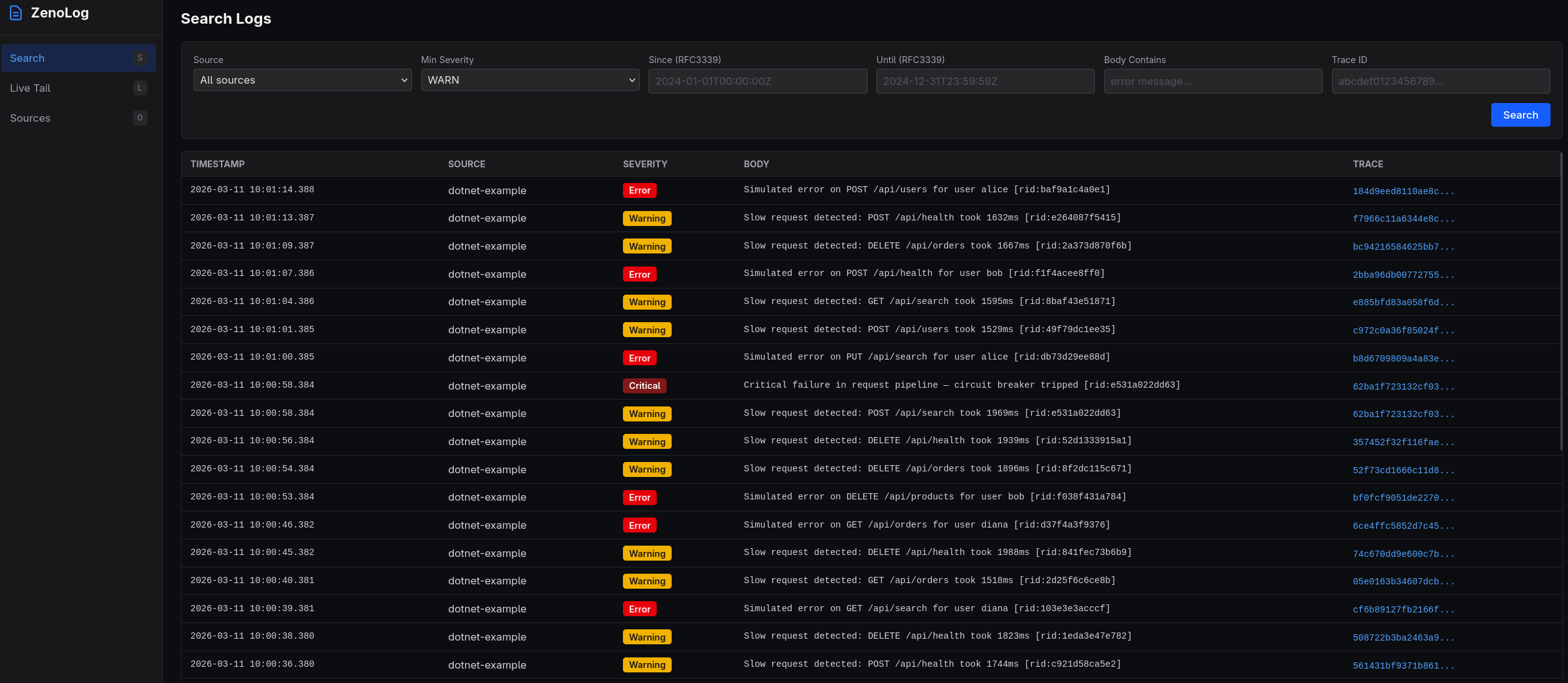
ZenoLog Web UI search view with severity filtering, time range, and trace ID lookup
Web UI — Live Tail
ZenoLog Web UI live tail view with real-time log streaming
Web UI — Trace View
ZenoLog Web UI trace correlation view showing all logs for a single trace ID
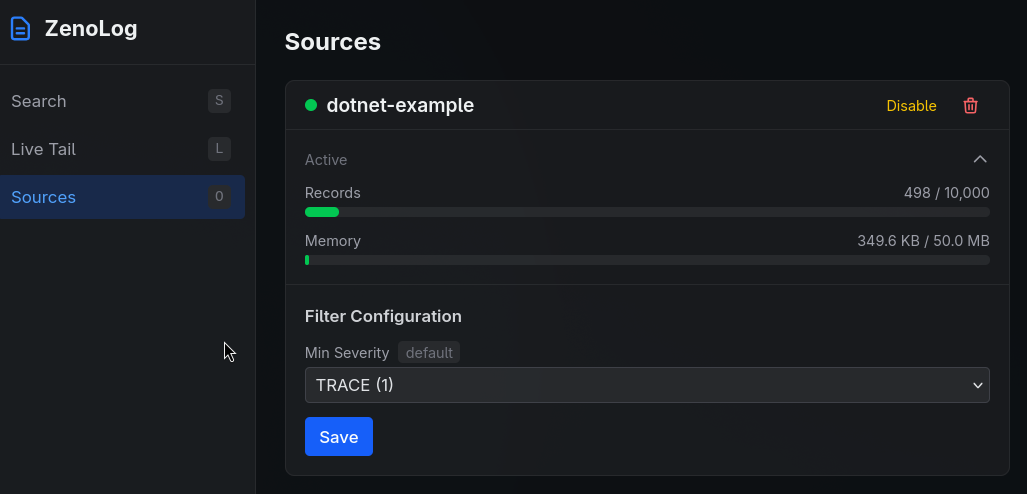
Web UI — Sources
ZenoLog Web UI sources management with records, memory usage, and filter configuration
Terminal UI — Live Tail
ZenoLog Terminal UI (TUI) with Bubble Tea live tail view
Features

Built for Real Workflows

Every feature designed around how engineers actually debug.

Native OTLP Ingestion

Dual-protocol OpenTelemetry receivers. Point your existing OTel SDKs and they just work.

  • gRPC on :4317
  • HTTP/protobuf on :4318
  • Zero configuration

Per-Source Ring Buffers

Automatic per-service isolation with dual-limit eviction. No noisy neighbor problems.

  • Count + byte eviction
  • Configurable per source
  • Up to 100 sources

Severity Filtering & Sampling

Per-source severity thresholds with probabilistic sampling. Control what you keep.

  • Per-source thresholds
  • Probabilistic sampling
  • Enable/disable on the fly

Full-Text Search

Instant search across all buffered logs with rich filtering. Find the needle in real time.

  • Source, severity, body text
  • Time range filtering
  • Trace ID lookup

WebSocket Live Tail

Real-time log streaming as events arrive. Watch your services in real time.

  • Source + severity filters
  • Fan-out architecture
  • Sub-millisecond delivery

Trace Correlation

Click any trace ID to see every log from that transaction, across all services.

  • Cross-service correlation
  • Trace ID indexing
  • One-click drill-down

Embedded Web UI

Full-featured SvelteKit dashboard compiled into the binary. No separate frontend to deploy.

  • Search & filter logs
  • Live tail streaming
  • Source management

Terminal UI

Bubble Tea TUI for terminal-native workflows. SSH into a box and inspect logs instantly.

  • Search, tail, traces, sources
  • Keyboard-driven navigation
  • Toggle & delete sources
Comparison

Measured. Not Marketing.

Real resource consumption compared to popular alternatives.

ZenoLog
Grafana Loki
ELK Stack
Container Image
ZenoLog
17 MB
Loki
65 MB
ELK
900 MB
Memory (idle)
ZenoLog
15 MB
Loki
512 MB
ELK
2 GB
Memory (10 services)
ZenoLog
~150 MB
Loki
~1 GB
ELK
~3 GB
Disk Required
ZenoLog
None
Loki
10 GB+
ELK
50 GB+
Startup Time
ZenoLog
<100 ms
Loki
~5 s
ELK
~30 s
Pods (Kubernetes)
ZenoLog
1
Loki
2–3
ELK
3–5
Metric ZenoLog Loki ELK
Container Image17 MB65 MB900 MB
Memory (idle)15 MB512 MB2 GB
Memory (10 services)~150 MB~1 GB~3 GB
Disk RequiredNone10 GB+50 GB+
Startup Time<100 ms~5 s~30 s
Pods (Kubernetes)12–33–5
External DependenciesNoneObject storageJVM, storage

Loki and ELK measurements based on minimal single-node deployments with default configuration.

Architecture

How It Works

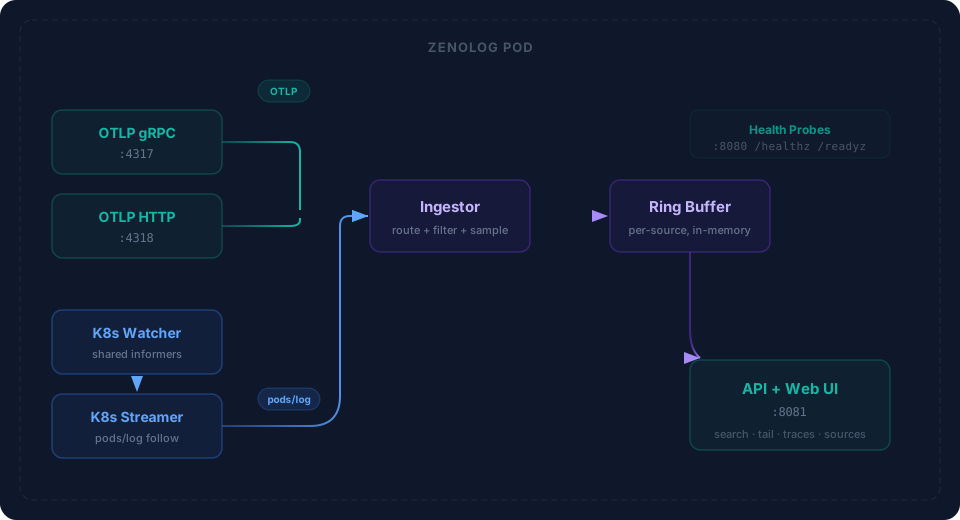
Four stages from SDK to screen — all in one process.

1

Ingest

OTel SDKs send logs via OTLP gRPC or HTTP. ZenoLog extracts service.name and routes to per-source buffers.

2

Filter

Per-source severity thresholds and probabilistic sampling decide what to keep. Drop noise before it enters the buffer.

3

Buffer

Per-source circular ring buffers with dual-limit eviction (count + bytes). Old logs fall off automatically.

4

View

Search, live tail, and trace correlation via the REST API — rendered in the Web UI or Terminal UI.

Port Map

:4317
OTLP gRPC
:4318
OTLP HTTP
:8080
Health Probes
:8081
API + Web UI
Deploy

Deploy in Seconds

Choose your path — all roads lead to logs.

Docker

Fastest path. Pull and run.

docker run -d \
  -p 4317:4317 \
  -p 4318:4318 \
  -p 8080:8080 \
  -p 8081:8081 \
  jimmytoenners/zenolog:0.1.0

Kubernetes

Single-pod deployment. Minimal footprint.

apiVersion: apps/v1
kind: Deployment
metadata:
  name: zenolog
spec:
  replicas: 1
  selector:
    matchLabels:
      app: zenolog
  template:
    metadata:
      labels:
        app: zenolog
    spec:
      containers:
      - name: zenolog
        image: jimmytoenners/zenolog:0.1.0
        ports:
        - containerPort: 4317
        - containerPort: 4318
        - containerPort: 8080
        - containerPort: 8081
        resources:
          requests:
            cpu: 50m
            memory: 128Mi
          limits:
            cpu: 500m
            memory: 512Mi
        livenessProbe:
          httpGet:
            path: /healthz
            port: 8080
        readinessProbe:
          httpGet:
            path: /readyz
            port: 8080

Binary

Single static binary. No runtime dependencies.

# Download
curl -L -o zenolog \
  https://get.zenolog.dev/latest

chmod +x zenolog

# Run
./zenolog

# Open Web UI
open http://localhost:8081

# Or use the TUI
./zenolog tui

Point Your OTel SDKs — That's It

Works with any language. Here's .NET as an example.

// .NET — Program.cs
builder.Logging.AddOpenTelemetry(otel =>
{
    otel.SetResourceBuilder(ResourceBuilder.CreateDefault()
        .AddService("my-service"));
    otel.AddOtlpExporter(o =>
    {
        o.Endpoint = new Uri("http://localhost:4318/v1/logs");
        o.Protocol = OtlpExportProtocol.HttpProtobuf;
    });
});

// That's it. Logs appear in ZenoLog instantly.
Configuration

Configure via Environment

Sensible defaults. Override what you need.

Variable Default Description
ZENOLOG_GRPC_ADDR:4317OTLP gRPC receiver address
ZENOLOG_HTTP_ADDR:4318OTLP HTTP receiver address
ZENOLOG_HEALTH_ADDR:8080Health / readiness endpoint
ZENOLOG_API_ADDR:8081API + Web UI address
ZENOLOG_MAX_SOURCES100Maximum number of distinct sources
ZENOLOG_RING_CAP10000Ring buffer record capacity per source
ZENOLOG_RING_MAX_BYTES10485760Ring buffer byte limit per source (10 MB)
ZENOLOG_SOURCE_RATE_LIMIT10Max new sources per minute (0 = unlimited)
ZENOLOG_CORS_ORIGINS*Comma-separated CORS allowed origins
Pricing

Simple Pricing

Free during early access. No credit card, no catch.

EARLY ACCESS
Free

Full feature set. No limits.

  • All OTLP ingestion protocols
  • Unlimited sources & ring buffers
  • Full-text search & live tail
  • Trace correlation
  • Web UI + Terminal UI
  • Prometheus metrics
  • Docker & Kubernetes ready
Get Started

Ready to See Your Logs?

Deploy ZenoLog in seconds. Point your OTel SDKs. Open the Web UI. That's the entire setup.

Get Started Now